Deutsch


Further information
Support bulletin board

You want to start with your Central Station® into the new world and for that accept our update offer? We are pleased with you, that the trendsetting digital control unit finally shows their qualities and we are here to answer all your questions around the 3.0.0 update.
-
 Allocation of function key symbols21.01.2022
What do the single function key symbols of the ECoS mean?
Here you´ll find an overview about the ECoS function key symbols, which can also be used with the Central Station "Reloaded":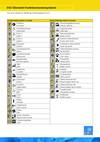
-
Will the PC interface change after the update?14.11.2011
Will I be able to continue to control my layout with my computer (via the CS LAN interface) after the update? Will the commands on the interface change because of the update?
The commands on the PC interface will be extended by the update. However, the interface will be compatible with the protocol of software version 2.x. Thus you can continue to use your existing PC software. We though recommend to contact your software supplier if there´s an updated version which allows to use the latest additional opportunities.
-
How to program Märklin signals 763xx with the ECoS / CS 1 "Reloaded"09.11.2011
1. Your Märklin signals need to be marked with a small red dot (label). Only then the Märklin signal update V2.0 has been carried out. Without this update it is neither possible to program the signals or use them in multiprotocol operation.
2. The Märklin signal has to remain within the packaging with the jumper for programming purposes only!
3. Only for programming (!) the signal with the ECOS / CS 1, it is important to activate "Motorola" and "Create asymmetric track signal" in the menu "Set up 1" and deactivate the RailCom feedback.
4. Create an appropriate signal in the turnout menu with the signal address to be issued and set "Switch" as well as "2.500mSec". Have the signal displayed on a rider tab of the command station.
5. To program the signal, connect its yellow and brown cable to the "main track connection" of the ECoS/CS 1. (Brown to track "B" and yellow to track ground "0").
6. Press the "Stop" button and then the "Go" button of the ECoS. The signal will now alternate between two aspects.
7. The following procedure depends on the type of signal (please also compare with CS 1 manual):
- 76391/76371/76372: confirm the signal on the screen. The signal will be programmed with the preset time of 2500 ms.
- 76392/76394: Switch to signal aspect Hp1. Wait until the signal starts to alternate between different signal aspects. Then switch to signal aspect Hp2.
- 76395/76397: the initial steps are the same as for the signals 76391 resp. 76393. Thereafter the distant signal will start to alternate between two signal aspects. Activate Hp1 or Hp0 of the corresponding main signal. If the distant signal is linked to a two-aspect main signal then press HP1 or Hp0 once again after the distant signal has started again to alternate between two aspects. Otherwise you activate the signal aspect Hp2 of the corresponding main signal.
8. The signal is now programmed. Press the "stop" button and remove the signal from the box and press "Go" to test it. Set the switching time back to 250mSec in the magnetic accessories menu of the command station.Important: Please wait for the signal to switch back and forth between two signal images before you restart programming. Make sure you have short breaks between the programming, otherwise the signal will stop the programming procedure. To start from the beginning, just press the "Stop" and "Go" button.
Hint: Furthermore, please always set the power supply voltage of the command station to at least 16V when operating 763xx signals! (Check menu "Setup2", select current monitor, compare voltage internal booster if > 16 Volt is shown).
-
Will the loco database remain after the update?08.11.2011
Yes, it will. The database of older Märklin® digital decoders which is already available within the Central Station will not be touched before the update and remain available.
-
Can you update a Central Station® prototype to the "Reloaded" version 3.0.0?08.11.2011
No, unfortunately not. The precondition to update your Central Station® is software version 2.0.3. or 2.0.4. as well as the later-on built-in Märklin® "sniffer module".
-
Will it be possible to program all CVs of all decoders after the update?08.11.2011
After the update the Central Station® will be able to program all DCC decoders on the programming track. There will be a graphical menu for the most important ESU decoders.
Mfx® decoders can already extensively programmed with the Central Station®. This will also be possible after the update.
-
Will I have to send you the Central Station® for installing the update?08.11.2011
Not at all! You don´t need to send your Central Station® to ESU for installing the update. You can either ask your ESU retailer to carry out the update or you can install the update youself.
-
Is it possible to use Märklin 6017 boosters after the update?08.11.2011
Of course, it is possible. All devices you have used so far can be further used after the update without any problems.
-
Is there already a manual for the CS "Reloaded" update?08.11.2011
Is there already a manual for the CS "Reloaded" update which describes all of its functions and applications?
Yes, the manual can be downloaded here. There comes a printed manual with every update package.
-
Is it possible to use the ESU mobile control 51100 after the update?08.11.2011
No, it is not possible. However, the successor ECoSControl Radio can be used. It has to offer more possibilities than the mobile control.
-
Is it possible to use LocoNet® devices after installing the CS "Reloaded" update?08.11.2011
No, unfortunately not. After installing the update it will not be possible to install Loconet® devices directly due to license problems. Loconet® is a proprietary system and the technology is currently not licensed to other companys.
However, it is possible to connect older Loconet®-based command stations via the sniffer input to your Central Station®. By doing so, are at least able to continue to use your hand held remote control units. A feedback (track occupancy detection) is not possible though.A product to solve this matter is already planned, the L.Net Adapter.
-
Can I use RailComPlus® with my CS1 Reloaded?08.11.2011
Can I use RailComPlus® with my CS1 Reloaded?
The Central Station 60621 does unfortunately not have a RailCom® feedback module. Therefore the RailComPlus® ability is currently not available. ESU works on a software update for the ECoSBoost booster. With this update owners of the Central Station "Reloaded" will be able to use RailComPlus when connected with an ECoSBoost.
-
Märklin Class 23 and Class 39 jerks during operation with ECoS / Central Station reloaded08.11.2011
I have purchased a Märklin Class 23 (or Märklin Class 39) with sound. The loco does not run properly when operated with my ECoS (or Central Station reloaded): It jerks and the sound is highly disorted. With other command stations the loco runs normal. What is do to?
The reason for this problem is the decoder installed. It is very sensitive in terms of voltage interruptions and prefers a relatively high track voltage. Furthermore it doesn´t cope with the RailCom function of the ESU command station. A correction is possible:
- Switch off the RailCom function in the setup menu of the ESU command station. Unfortunately you will have to do without the RailCom function when operating those decoders.
- Increase, if available, the track voltage of the adjustable power supply to approximately 19.5V.
We are sorry about the problems here which are explicitely caused by the decoder, not the ECoS.
-
Track voltage of ECoS / Central Station Reloaded messbar?08.11.2011
How can I measure the track voltage of the ECoS / Central Station Reloaded?
With a digital measurement device it is not possible to measure any track voltage.
The displayed voltage level varies according to the set protocol. Also if you call up and control trains, the voltage fluctuates on the digital multimeter (only on the device, not on the track). The voltage level depends on the measurement device and will always show a wrong value since the track voltage is not a pure AC or DC voltage. And only those can be measured by a multimeter. All other voltages will be interpreted over an "effective value".
This is why we have established a current monitor in the setup menu of the ECoS / Central Station Reloaded. The values shown there are correct. This will also help to adjust the output voltage of the adjustable power supply.
-
When will the update be available and what will it cost?04.11.2011
The delivery of the update started in 2009. The delivery period takes 4-6 weeks. The updates will be shipped according to receipt of order. The non-binding recommended selling price in Germany is € 174,99.
-
What programs will be supported by the computer interface?02.11.2011
The computer interface from the Central Station® will be adjusted and expanded like the ECoS interface. The software solutions currently available (including Win-Digipet, RailWare, RailRoad&Co, Control-GUI, Touchcab) will continue to operate.
-
The loco icon displayed on the ECoSControl radio differs from the ECoS's loco icon.02.11.2010
The loco icon displayed on the ECoSControl radio differs from the ECoS's loco icon.
The ECoSControl Radio uses its own set of loco icons. The assignement needs to be done manually on the ECoS.
You can assign the icon in the menu "Edit loco". Please choose the tab "Properties" and select the sub-menu "External controllers".

You may now assign the desired symbol.
-
Set the dimmer for lights and other Aux-outputs with ECoS05.07.2010
How do I set the dimming function for light and other Aux-Outputs with the ECoS.
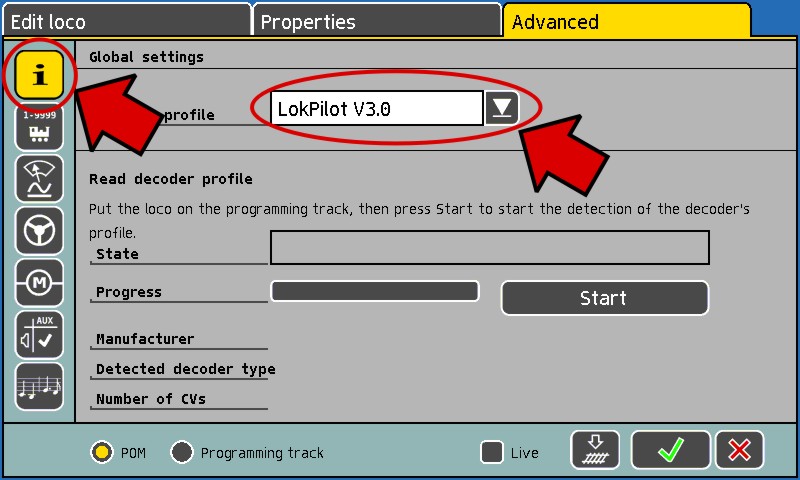
These settings can be easily set up in the menu "Edit loco". To do so, select the tab "Advanced".
First select your decoder type in the menu "Global settings" (symbol 'i'):

Please note that the dimmer settings via "Loco edit" are only available for ESU decoders. For decoders from other manufacturers, please use the menu "Decoder programming" in the menu "Setup". To determine the matching CVs, your decoder's user manual may be necessary.
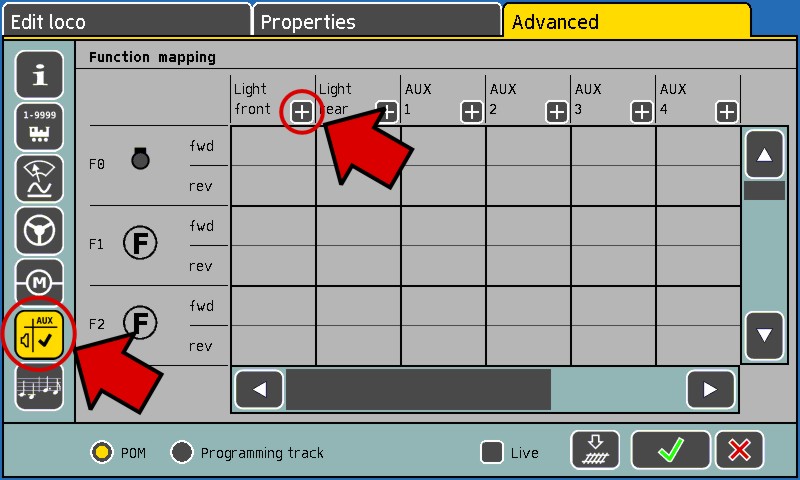
Change to the menu "Function mapping" (symbol 'AUX') and press the '+'-symbol in the description line:

The "+"-symbol only appears at outputs which support this extended functionallity.
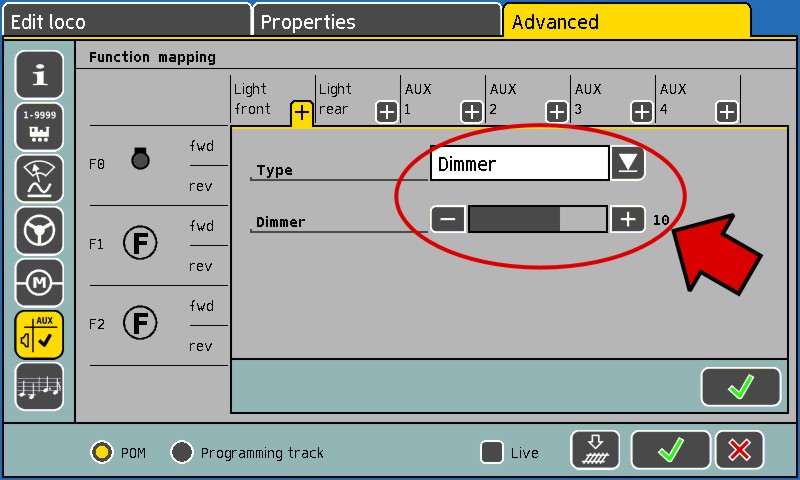
The settings screen for the corresponding output appears:

Choose "dimmer" as type and set the "Dimmer"-bar to the desired value. The settings can now be accepted by clicking "Ok".
Please note:
Settings in the function mapping menu will not be written "live" even if the "Live"-Checkbox is set. To write the function mapping and the dimmer settings, please click on the track symbol "write to track". -
The firmware update aborts with an error message. What shall I do?14.10.2009
The firmware update is aborted with the error message "Wrong CRC!!!" or "The firmware update was not successful". What is the reason for this?
The ECoS / Central Station "Reloaded" cannot use the provided update file. This can be due to the following reasons:
- No file has been selected.
- The transfered file is actually meant for a different device, e.g. you tried to install the ECoS update 1.1.3 on an ECoS with software version >=2.5.1.
- No *.bci-file has been selected, but e.g. a *.zip-file.
- The file transfer to the command station has been interrupted.
- The file is corrupted. Probably an error occured during the download from the ESU homepage. Please try again! If the error occurs once again, please download the *.zip-file instead of the*.bci-file from the homepage and unpack it. Try to install the included *.bci-file.
-
Is it possible to connect a "Reloaded" updated CS1 to a non-updated CS1?16.06.2009
Yes, that´s possible. The Central Station can be connected to the sniffer input, like every other command station.
-
I can not do the update myself. What can I do?09.05.2009
Please contact your dealer who has sold you the update package first, so if help is not given, the update may install by ESU for you. Thus, you should begin the update package with your purchase and then your Central Station® disk along with well-packaged to send ESU.
The installation of updates are ESU in-service costs € 19,50 (in germany, including 19% german sales tax). Please send no cash, you will receive an invoice. -
Is the ESU ECoS now also mfx® compatible?07.10.2008
With the release of the 3.0.0 update for the Central Station®, there will also be an update available for the ESU ECoS. In this update the compatibility with all mfx® decoders will be included. The two platforms are from the software 3.0.0. on function-identically and simultaneously with updates may be met.
The ECOS update is part of the product care and available free of charge.
-
My serial number is ten digits long! Can I still order the update?07.10.2008
Of course. If you look at the serial number in the setup menu screen of the Central Station® there is possibly a "0x" prefix. Enter in your order only the last 8 digits (without the "0x").
-
After the update does my entered locomotives still exist?07.10.2008
Normally yes. The locomotives stored in the Central Station® are not deleted during the update and will be available after the update for use. To exclude any eventuality we would recommend to do a backup before the update.
-
I don't need the power supply of the update package. Will there be a "software-only"-type update?07.10.2008
The 90VA power supply of the update package is necessary to use the advanced internal booster output. Therefor no "software-only" package is not planned.
-
Will there be more than previously loco icons?07.10.2008
Yes. The selection of loco icons after the 3.0.0 update is significantly larger and will be constantly expanded.
-
Do my warranty claims against Märklin ® expire after the update?01.10.2008
For all Central Station ® 60212, which during the statutory warranty period ESU the 3.0.0 update is being installed, ESU legitimate right for all warranty claims occur. Details about the end we will announce in due time. The update is for you without risk as a customer. For all questions about the new features and capabilities of the Central Station you can apply directly to ESU. Our successful support forum is available after the update.
-
How to install this update?29.09.2008
The update can be installed either by yourself or your dealer. You will need a PC (Windows, Linux or Mac ®) with network and a network cable to the Central Station ® connected to your PC.
The update will be performed - identical to the previous Software Updates – through the Web interface to the Central Station ®. The update procedure is using your internet browser to copy the file to the Central Station ®. The process is described in the manual for software updates.
A detailed, step-by-step instruction, we will be published before the availability of the updates.
One big difference to previous updates or updates for the ESU ECoS is, this update requires from each Central Station ®, an individual serial number to generate an update file. The file will only be accepted by the Central Station ® if the serial number matches. The attempt to update other units with a different serial number as applied will produce an error message and the procedure will be canceled.
-
Which prerequisites are necessary prior to the Central Station® update 3.0.0.?29.09.2008
The ESU update can only be used exclusively by the owner of the Märklin ® Central Station ® 60212. It will not work on other digital control units.
Furthermore, your Central Station ® 60212 must have software 2.0.3. or 2.0.4. installed. This is the case if your Central Station ® has already received an update by the Märklin ® service and the so-called Sniffer module has built in.
If you are unsure whether your Central Station ® 60212 is already on the software version 2.0.3. or 2.0.4., you can use them in the setup menu under "General Information" to read.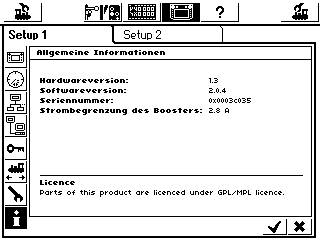
Your Central Station ® has software 1.xxx version installed, so you need to send it to Märklin ® service get it updated to version 2.0.4. Thereafter, the ESU software update to 3.0.0. can be applied.
Currently (as of September 2008) Märklin ® installs these updates free of charge.
-
Will there be further updates in the future?29.09.2008
Certainly. The development will be continued permanently. Any further updates will ESU provide to all registered users of the ESU Support Forum for free. You pay only once. Guaranteed.
-
Will the Central Station® remain fully mfx®-compatible?29.09.2008
The Central Station® will be fully mfx® compatible after the update to version 3.0.0. All mfx® locomotives will proceed as usual running and programming, and will also automatically log on to the Central Station®.
-
Is the Central Station ® really fully DCC compatible? What does this mean for me?29.09.2008
The Central Station ® has the open, standardized DCC protocol fully implemented. The long experience of ESU in this area guarantees a smooth implementation of all major DCC decoder.
This provides for you as a three rail user some key benefits: All leading manufacturers today offer trains for the three rail system in which (ESU) multi-protocol decoders are installed (eg Roco, Liliput, Brawa, Mehano, Lima, Rivarossi, Hobbytrade to name a few). These locomotives can immediately respond to DCC. Besides the driving with up to 20 functions as well as a range of addresses to 9999, you can comfortably program your decoder with the Central Station ® ...
In the future you have the choice between all makes locomotives. -
How may ESU ensure the support?29.09.2008
The support for the Central Station is through your ESU dealer and especially through our unique ESU Support Forum ensured.
All registered owners of a Central Station® 3.0.0 update can ask their questions here and receive either by other competent forums members or our support team immediately assistance.
We show since 2006 that this works. Even the support forum is one of ESU introduced soon counterfeit ideas. -
What is different from a Central Station® with an update to an ESU ECoS?29.09.2008
After the software update to 3.0.0. the software features of Central Station ® and ESU ECoS are identical. The development of the ESU ECoS and Central Station ® 60212 will take place in parallel; new software versions will always be for both platforms available.
Since the update can not change anything to the hardware, unfortunately, there are compared to the ECoS following restrictions:- The Central Station ® uses an endless rotary control for speed control instead of the motorized potentiometer of the ECoS.
- The Central Station ® built boosters can not support RailCom ® feedback. By connecting an ECoSBoost this functionality can be retrofitted.
-
Will there also be free updates for the Central Station® 60212?29.09.2008
The software code 3.0.0. is based on code, which was newly developed. Further developments of version 2.0.4 is therefore not possible.
If you are using the functionality of version 2.0.4. and not being satisfied, we advise you to switch to version 3.0.0. This is only way you can benefit from the many additional functions of the Central Station.
All further updates from 3.0.0. are obviously free of charge. -
How can I order the update for the Central Station®?29.09.2008
This Update 3.0.0. for the Central Station ® 60212 is not free of charge, you must pay for it. You can order this at every ESU dealer.
The order number is 59990.
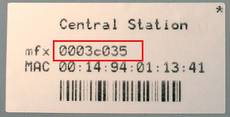
You need the serial number of your Central Station ® at the time of ordering.
The serial number can be read from the label on the bottom of the Central Station®.
-
What is included in the 3.0.0 update?29.09.2008
The 3.0.0. update for the Central Station ® 60212 consists of device and software components. The package includes:
- One for all appropriate gauges, stabilized switching power supply with an output of 90VA and an adjustable output voltage from 15V - 21V
- A stylus for the touch screen operation.
- An individually for you and your Central Station ® 60212 based on your serial number 60212 produced disk with the software update 3.0.0. with an extensive range of functions. This software is coded so that only the Central Station ® can be applied, whose serial number when you order with your retailer indicated. The update on this unit can theoretically be applied as often.
The Software-Features by the 3.0.0 update are obviously also significantly upgraded.